Features

From sales to accounting, every feature

Every module uses the same customer, product, workplace and employee cards. Below is what you can do, area by area; the screens are taken from the live demo.

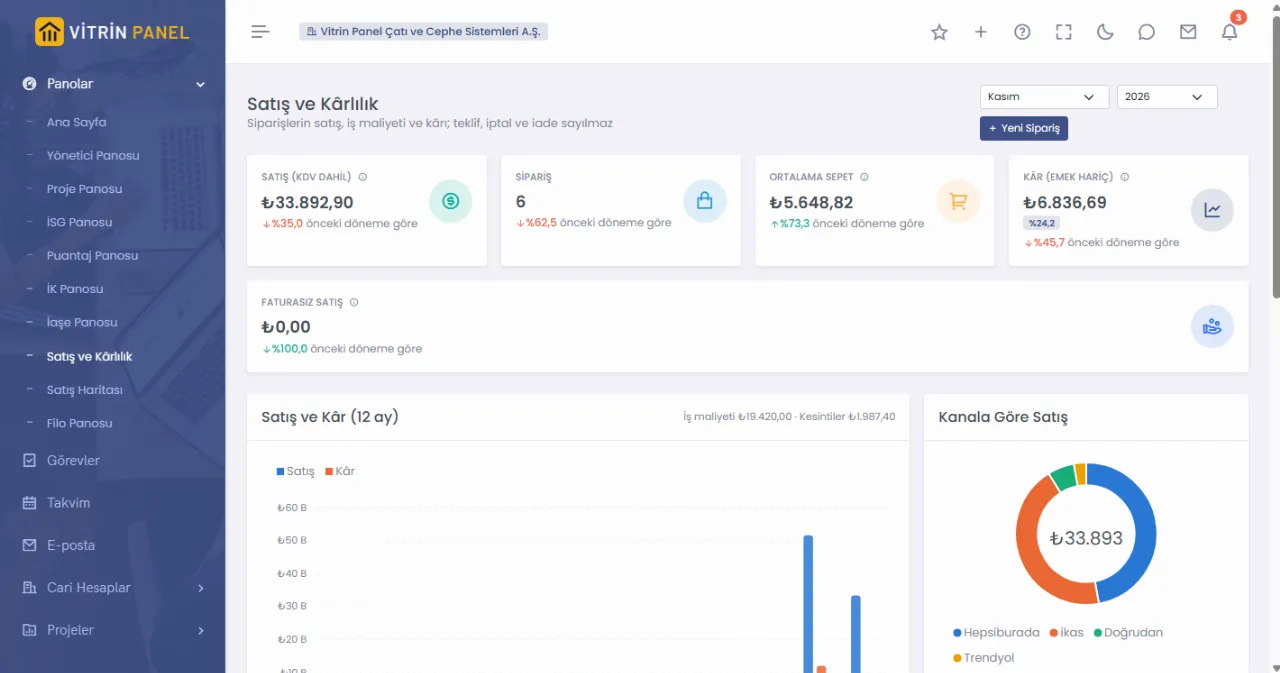
Sales and profitability dashboard: sales, orders, average basket and profit cards, sales by channel chart
Sales and customers

From the quote to the collection

Every customer record gathers on the account card: meetings, quotes, orders, invoices, payments.

Account card

Tax numbers are checked against the revenue administration list; addresses, contacts and bank accounts in one place.

Customer meetings

Meeting notes and follow-up dates; the owner is notified when the date comes.

Bid outcome analysis

Won and lost bids, with the reason and the competing price.

Price lists

Lists per customer, per province or general; the price is suggested automatically on sales documents.

Sales orders

Supplier orders, invoices and deliveries open from the order; invoiced quantities are tracked line by line.

Currency-indexed invoices

Currency-indexed invoices close at the payment-day rate; the exchange difference is calculated automatically.

Dealership

Intermediary sales profit, supplier rebate agreements, period rebates and rebate invoices.

Statements and reconciliation

Account statements, balance reconciliation and BA / BS forms.

Marketplaces and e-commerce

All your stores on one screen

Works both ways with your Trendyol and Hepsiburada stores and pulls orders and products from ikas. Direct sales sit in the same list.

Orders

Store orders arrive by themselves; older orders can be rebuilt from the XML of a GİB portal invoice.

Stock updates

Stock reported to the store = warehouse − open orders not yet deducted.

Shipping desk

Bulk packing, picking lists and labels: thermal 100×150, A4, A5 or A6.

Invoice upload

Sales invoices are uploaded to the store; orders awaiting an invoice or its XML are shown separately.

Statements and payouts

Commission and shipping deductions are finalised from the statement; payouts are booked with the bank collection and an offset entry.

Returns and questions

Return requests and customer questions are answered without opening the store panel.

Product profit

Profit per product per store, break-even and target prices; campaign what-ifs.

Sales map

Orders by province and district, repeat customers.

Shipping desk

The day's shipments from one screen

  • Orders are sorted by delivery promise; late ones are red.
  • Pack the selected orders on the marketplace, print their labels and mark them as shipped.
  • If the marketplace label is unavailable, your own label with the tracking barcode is printed.
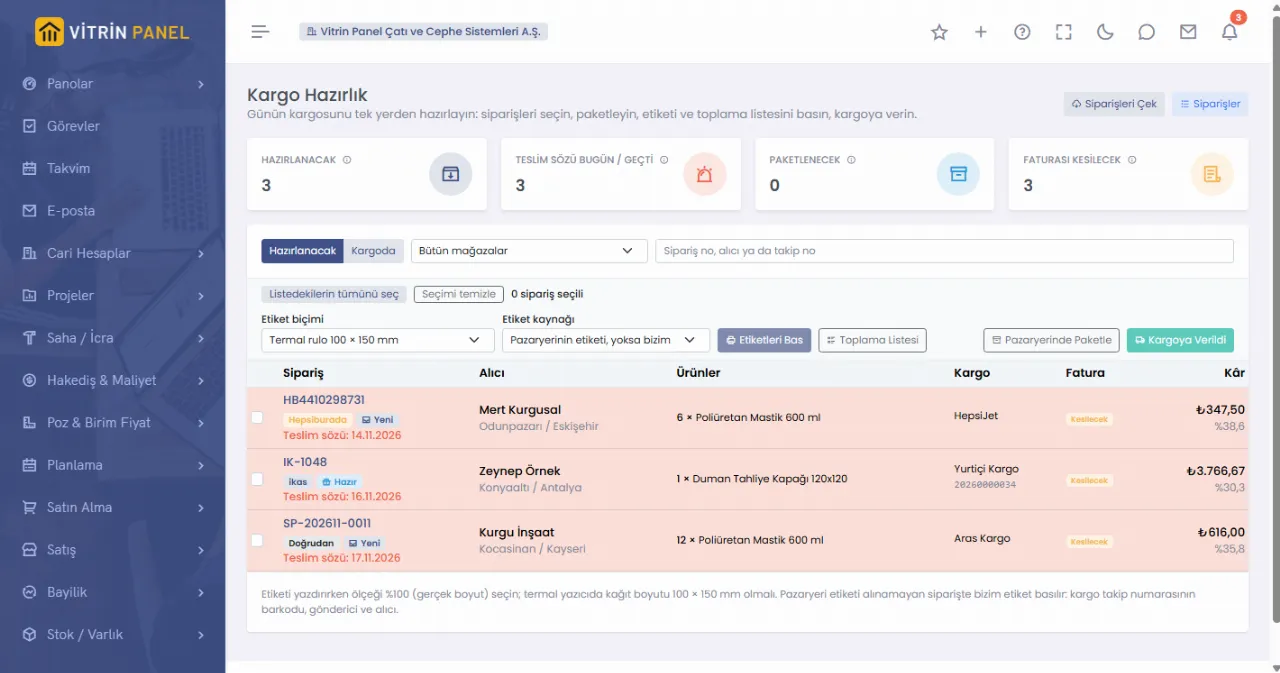
Shipping desk: orders with an approaching delivery promise, label format and bulk action buttons
Sales map

Where your products sell

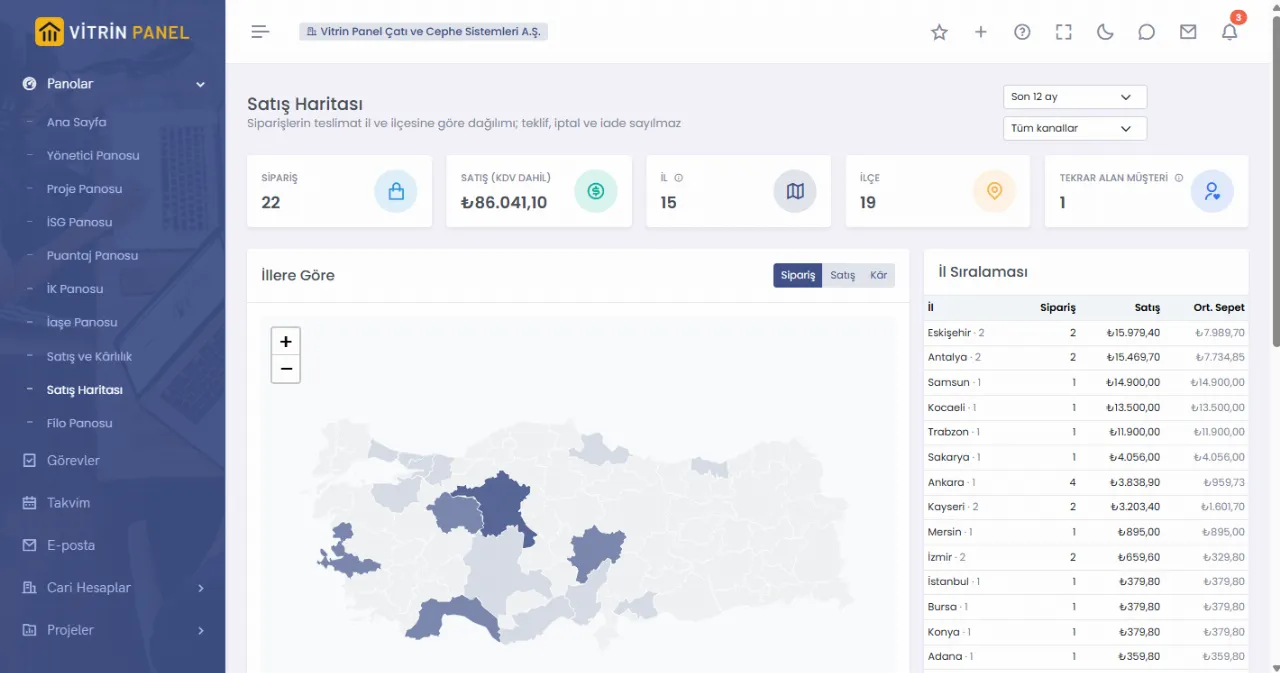
  • Orders, sales and profit by province on the map; district breakdown and repeat customers alongside.
  • Filtered by channel and period; quotes, cancellations and returns are excluded.
  • Addresses are never sent to an outside map service.
Sales map: order density by province on a map of Türkiye and a province ranking
Production, purchasing and stock

The real cost of a product

Materials, machines and labour in one calculation; every stock movement reaches the ledger.

Recipes

Semi-finished goods, different units (g ↔ kg, ml ↔ l) and recipe copying.

Work centres

Machine and labour share is added to product cost at an hourly rate.

Own or contract workshop

Materials at a contract workshop are tracked in a consignment warehouse; products come in with goods receipt.

Scrap and variance

Actual consumption, scrap reason and cost; variance against the recipe.

Purchasing

Requests, quotations, approval rules by amount, orders, goods receipt and the e-Waybill inbox.

Warehouses and counts

Transfers between warehouses, count differences, deliveries and transport.

Fixed assets and issues

Fixed asset or expense by the tax threshold; staff issues and kits.

Product families

Colour and size variants are grouped under one parent product.

Projects and sites

From bid to final account

Every step of construction and contracting work; each site is opened as a social security workplace.

Quantities and estimates

Official price item archive, unit-price bids and bid letters.

Scheduling

Gantt, critical path, baseline and earned value; workforce capacity.

Site logs and diary

Approved site logs feed progress and billing; the site diary is frozen on approval.

Quality

Inspections, measured checks, concrete samples and non-conformity / corrective action.

Progress billing

Customer and subcontractor billing; advances, deductions and retention are applied automatically.

Escalation and final account

Index-based price escalation; work increases / decreases, provisional and final acceptance.

Joint ventures and long-term contracts

Partner shares and profit split per project; on long-term contracts billing and cost are released to results on acceptance.

Budgets

Project budgets, revision history and comparison with actuals.

Scheduling

Progress comes from the field

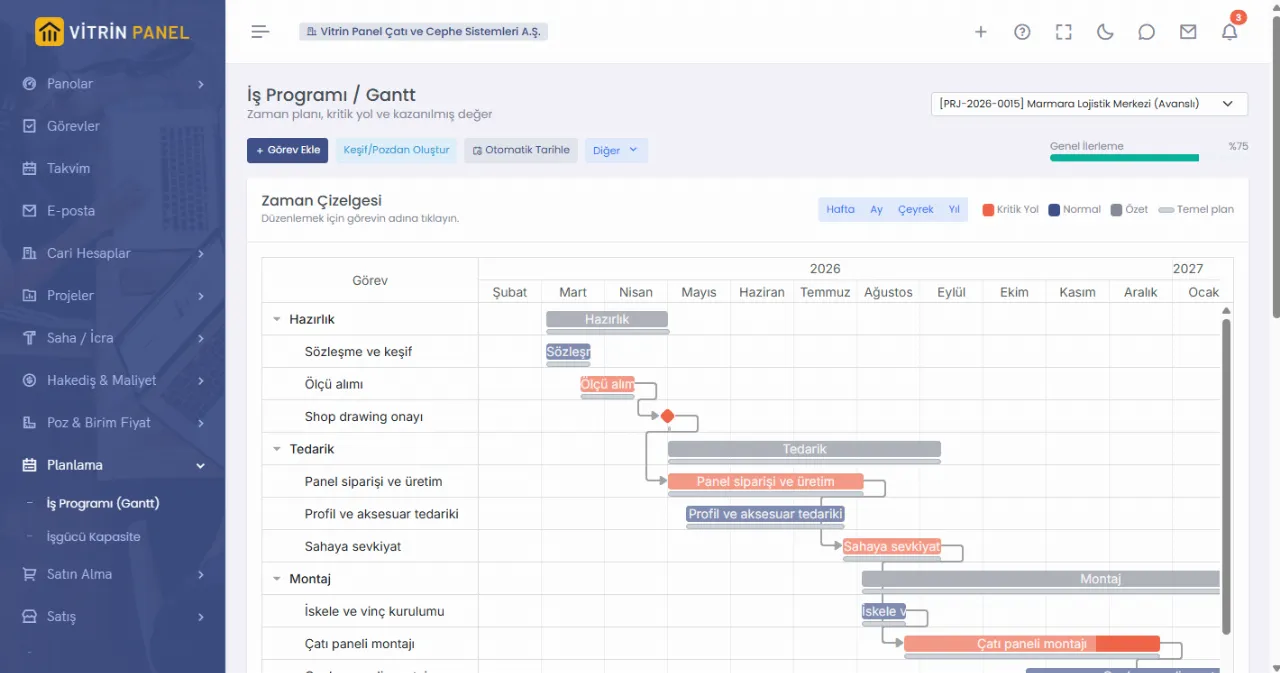
  • Tasks linked to price items take progress from approved site logs; no manual percentages.
  • Critical path and baseline on the same chart; delays are visible at a glance.
  • The task list is built automatically from the estimate or price items.
Schedule: Gantt chart with task bars, critical path and baseline lines
HR and payroll

From hiring to severance

The employee card is opened once; timesheets, leave, payroll and social security all run from it.

Personnel files

Family details, required documents by position and missing document tracking.

Leave

Legal conditions (service, family member, day limits) are checked on request; hourly nursing leave, printed leave form.

Timesheets and meals

Workplace sheets, overtime, meal counts and vehicle sheets; approved months are locked.

Payroll

Cumulative tax base, disability allowance, retired employees (SGDP), bonuses and benefits.

Social security

Hire / exit XML, monthly returns and withholding report; cross-check against the SGK file.

Discipline and performance

Disciplinary records; wage deductions reach payroll automatically. Performance reviews.

My Page

Employees request leave and advances, see their payslips, enter family details and report hazards on site.

Severance and exit

Severance ceiling by period; open assignments and timesheet rules are checked on exit.

HR dashboard

Your team over the last 12 months

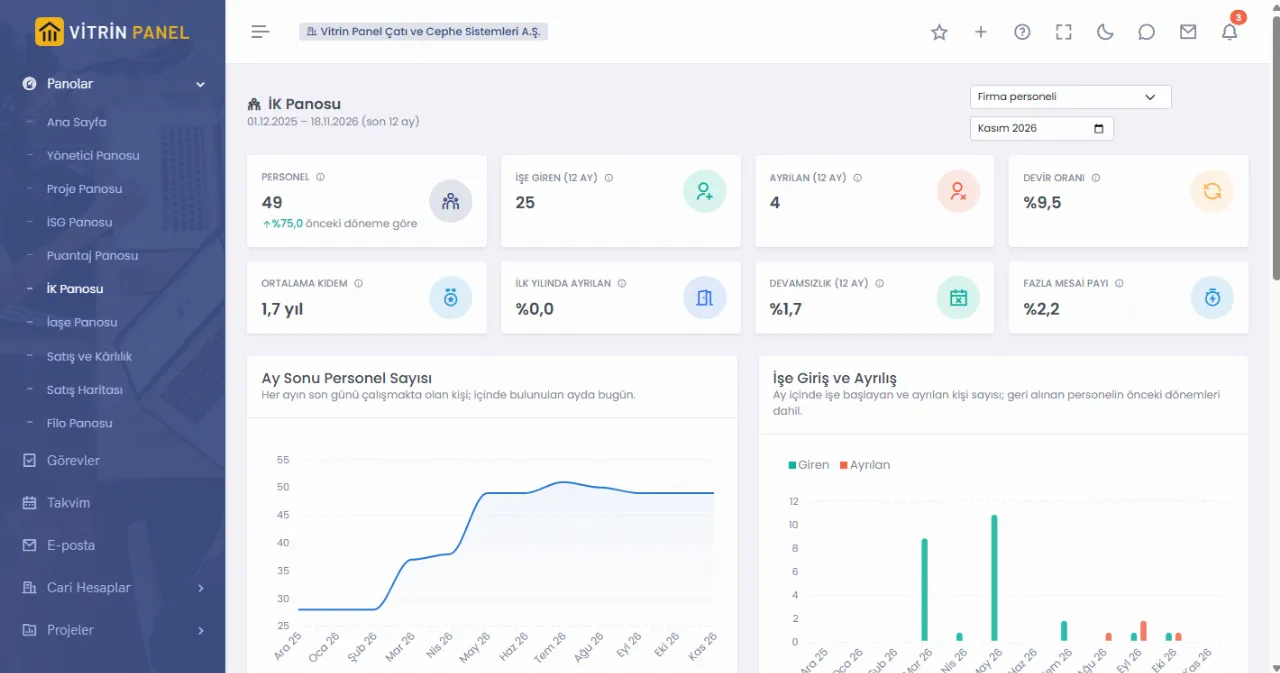
  • Headcount, hires and leavers, turnover and average tenure.
  • Absenteeism and overtime share are calculated from timesheets.
  • Subcontractor workers are selected separately and never mixed with your own staff.
HR dashboard: headcount, hires, leavers, turnover, tenure and absenteeism cards with charts
Finance and accounting

Where the money is and whom we owe

From cash and bank to financial statements; every transaction posts its own entry.

Cash and bank

Upload the bank Excel statement, get a match suggestion for every line, book it on your approval.

Cheques, loans, cards

Cheques / notes and endorsements, direct debit, loan instalments, corporate card statements, letters of guarantee.

Payment schedule

Payables coming due in one list; pay straight from it.

Rates and exchange differences

Central bank rates arrive automatically; exchange difference and month-end revaluation entries are ready.

Expenses and advances

Staff expense claims, work advance settlement and approval flow.

Cost allocation

Cost centres, overhead pools and allocation of head office share to projects.

Accounting

Journal, trial balance, balance sheet, income statement, VAT offset, year-end close.

Export to accounting software

Entries are exported in Excel; the accountant's adjusting entries come back in.

Fleet and safety

Vehicles, machines and site safety

Every penny of a vehicle on its scorecard, every incident on site in the record.

Vehicle scorecard

Fuel, maintenance, rental and expenses on the vehicle card; mileage and consumption.

Fuel statements

Station Excel files are matched to vehicles by plate and to sites by fill date.

Electric vehicles

Charge cards, workplace chargers and consumption in kWh.

Damage, policies, tolls

Damage records, insurance policy tracking and toll statements.

Service, inspection, fines

Service records, inspection dates and traffic fines on the vehicle card.

Rentals and machine timesheets

Daily engine hours of machines and rental periods; idle days show up in cost controls.

Health and safety

Risk assessments, incidents, PPE issue, medical exams and committee meetings.

Accident rates

Accident frequency and severity rates are calculated from timesheet hours.

Team and documents

Your team talks in the same system

Tasks, email and documents stay with the record they belong to.

Tasks and calendar

Owner, assignees, steps and comments; dates on the calendar.

Email

Your company mailbox inside the ERP; shared mailboxes and tasks from messages.

Messages and notifications

In-company messaging; work waiting for approval arrives as a notification.

Delegation

Hand over your approval rights for a set period while on leave.

Document management

Versions, confidentiality and record attachments; time-limited sharing links for outsiders, with an optional password.

Partner Portal

Subcontractors and suppliers see their own billings, documents and filings; they do not count as users.

Approval flows

Purchases go through tiered approval by amount, expense and leave requests go for approval; pending work arrives as a notification.

Support requests

Raise an issue from inside the ERP; messages and attachments stay with the request.

Platform and security

Every company in its own database

Permissions, logs and backups come set up from day one.

Separate database and backups

Each company's data in its own database, backed up every night.

Roles and workplace access

Ready-made role templates; users see only the records of workplaces they are allowed.

Audit trail

Who changed what and when; every exported file is logged.

Excel import

Accounts, products, staff and opening balances with ready templates.

API and webhooks

Your own software reads and writes with a scoped key; events arrive as signed webhooks.

Turkish and English

Each user chooses the interface language.

On the phone

Screens adapt to phones; list rows open as cards.

Help and guides

Page guides and field explanations on screens, plus help articles.

Try it on your own business

Leave a request and we will set up your account for your industry. To look around right away, the live demo is open.

Request access