ERP for businesses

From sales to payroll, every record of your business in one system.

Customers, invoices, stock, staff, payroll and accounting run on the same data. A contractor runs its sites, an online seller its marketplace orders and a workshop its production in the same system; every approved document posts its own journal entry.

  • Turkish uniform chart of accounts
  • e-Invoice / e-Archive / e-Waybill
  • Social security filings
  • Trendyol · Hepsiburada · ikas
  • Turkish and English interface
  • Data protection (KVKK) logs
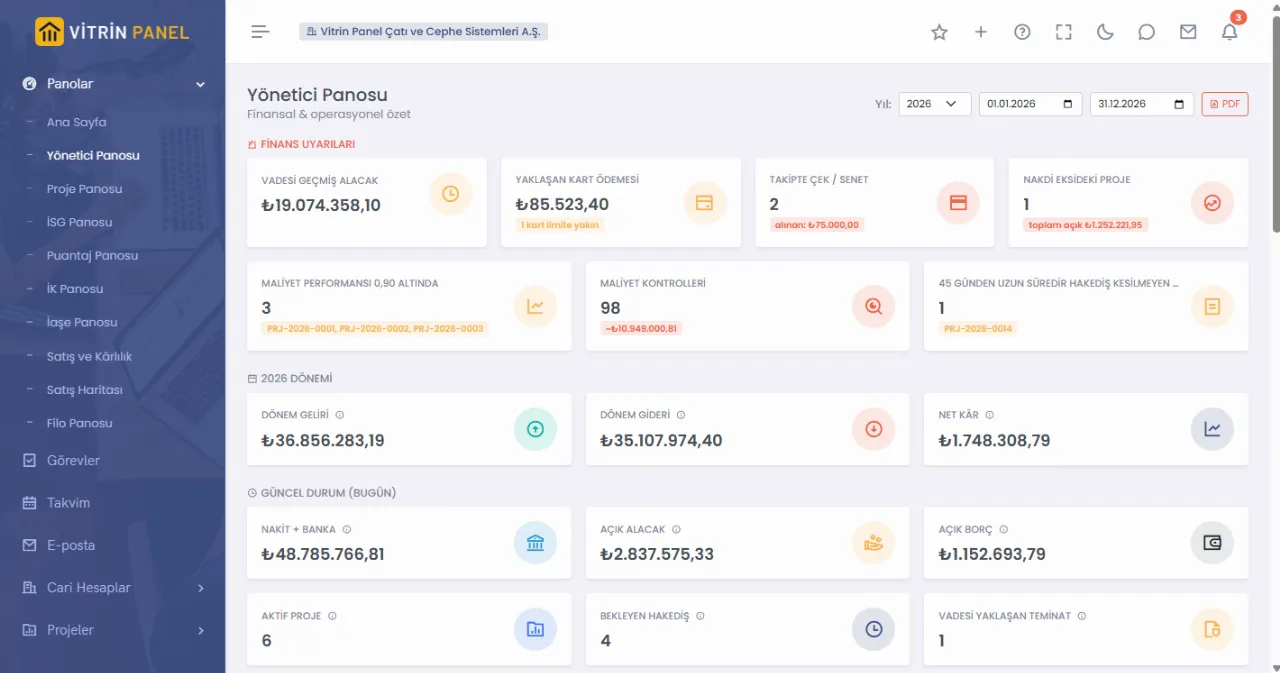
Executive dashboard: finance alerts, period income / expense, cash and open receivables
Finance alerts on the dashboard every morning: overdue receivables, cards near their limit, projects with negative cash.
Who it is for

It opens to fit your business

You pick your industry when signing up; screen terms, ready-made categories and suggested modules follow it. Modules you do not use stay out of your menu.

Construction and contracting

Bids, sites, progress billing, subcontractors and timesheets. Building and specialist trades such as roofing and cladding come with their own terms and categories.

E-commerce and marketplaces

Trendyol, Hepsiburada and ikas orders, shipping labels, account statements and the profit of every product in every store.

Production and wholesale

Recipes, work centres, scrap and real product cost; from customer order to supplier order, invoice and delivery, with dealer rebates.

Services and general business

Customers, invoices, cash and bank, staff, payroll and accounting. With several companies, one user switches between them.

One flow

Every record is entered once and flows on

Every step starts from the record of the one before. Each approved document posts its own journal entry; there is no separate transfer at month end.

  1. 1

    Quote and order

    A won bid becomes a project; an approved customer order turns into supplier orders and invoices.

  2. 2

    Purchasing

    Requests, quotations, orders and goods receipt; the invoice is checked against the order and the quantity received.

  3. 3

    Stock and production

    Goods receipt adds stock; production consumes by recipe and puts the product into the warehouse at cost.

  4. 4

    Invoice

    Sales invoices go out as e-Invoice or e-Archive; incoming invoices are taken from the inbox.

  5. 5

    Collections and payments

    Cash, bank, cheques and cards; payments close open invoices and bank statements are matched with suggestions.

  6. 6

    Timesheet and payroll

    Payroll is calculated from the timesheet; social security and withholding filings come ready.

  7. 7

    Accounting

    Every approval posts its own entry; trial balance, balance sheet and income statement stay current.

What it does

Managers ask, the screen answers

The screens below are taken from the live demo. The company and people in it are fictional; the records were produced by a real workflow.

Cash

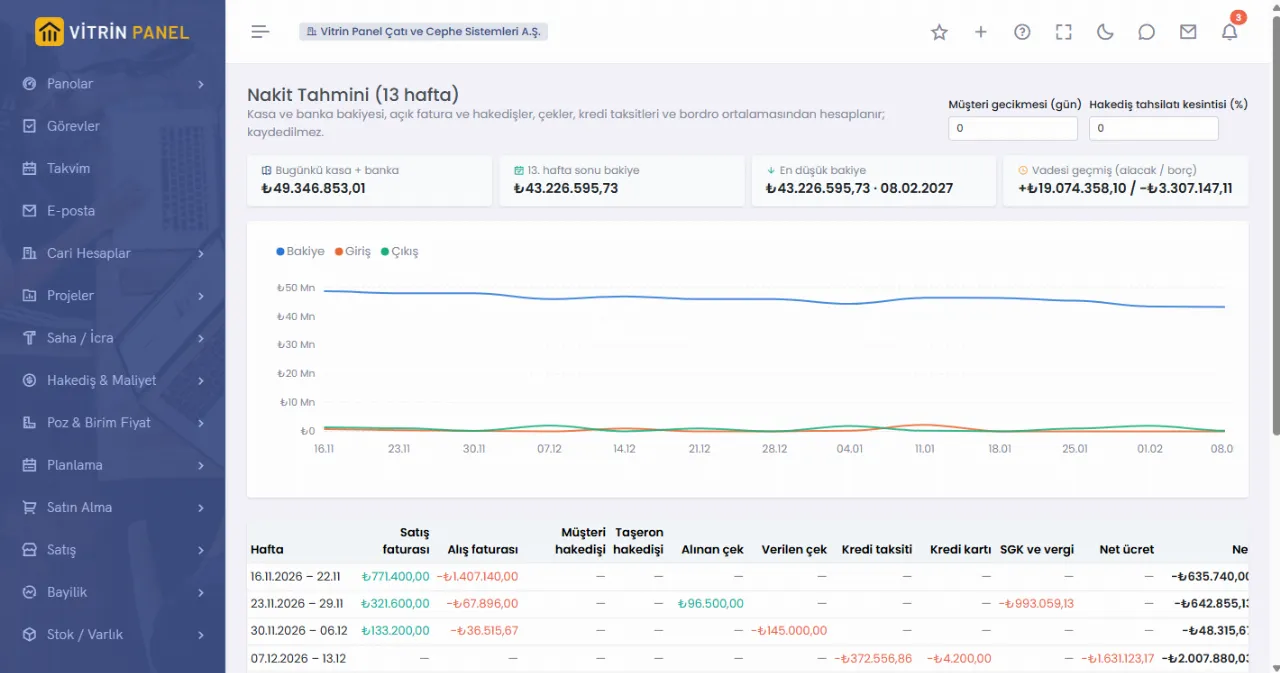
Cash for the next 13 weeks

  • Built from cash and bank balances, open invoices, cheques, loan instalments, card payments and average payroll.
  • Change customer delay to see what happens "if payment comes late".
  • The week with the lowest balance is visible at a glance.
13-week cash forecast chart and weekly table
Marketplaces

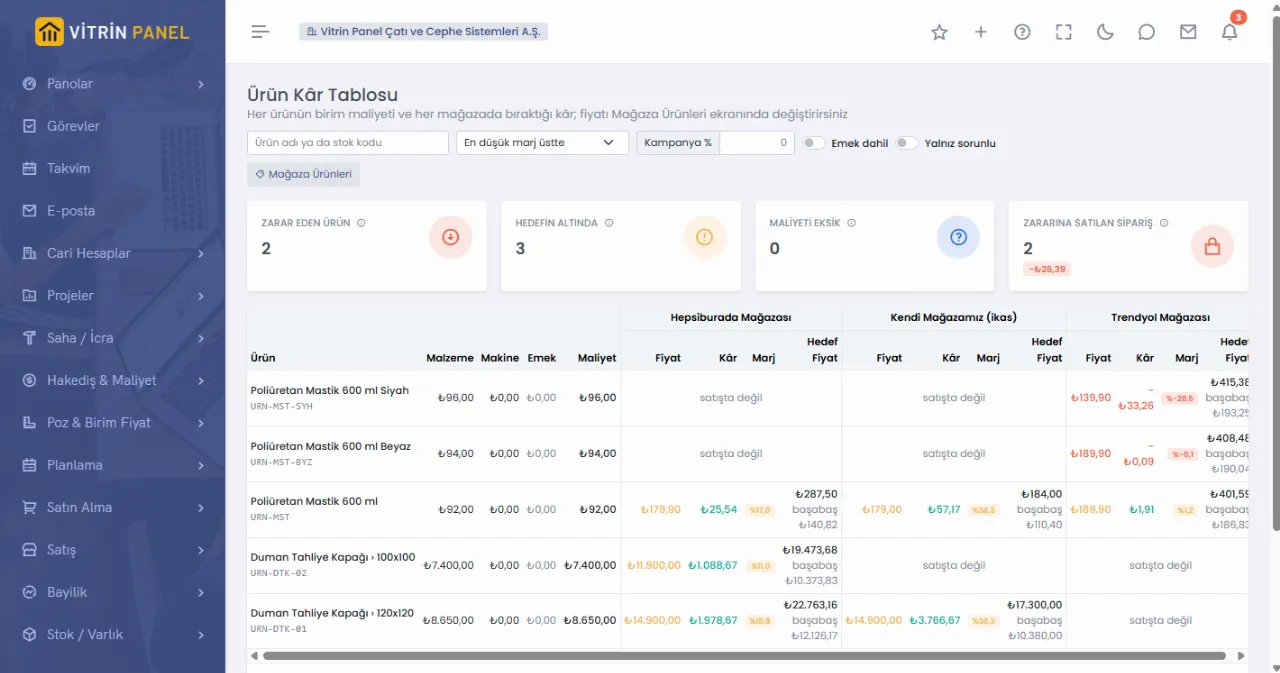
What every product earns in every store

  • Trendyol, Hepsiburada and ikas orders arrive by themselves; you add phone or Instagram orders by hand.
  • Product cost comes from average stock cost or the recipe; commission and shipping deductions are finalised from the account statement.
  • Break-even and target prices are ready for every product; try a campaign discount and see where profit lands.
  • Orders sold at a loss and products below target have their own filter.
Product profit table: each product's cost and its price, profit, margin and target price in every store
Project profitability

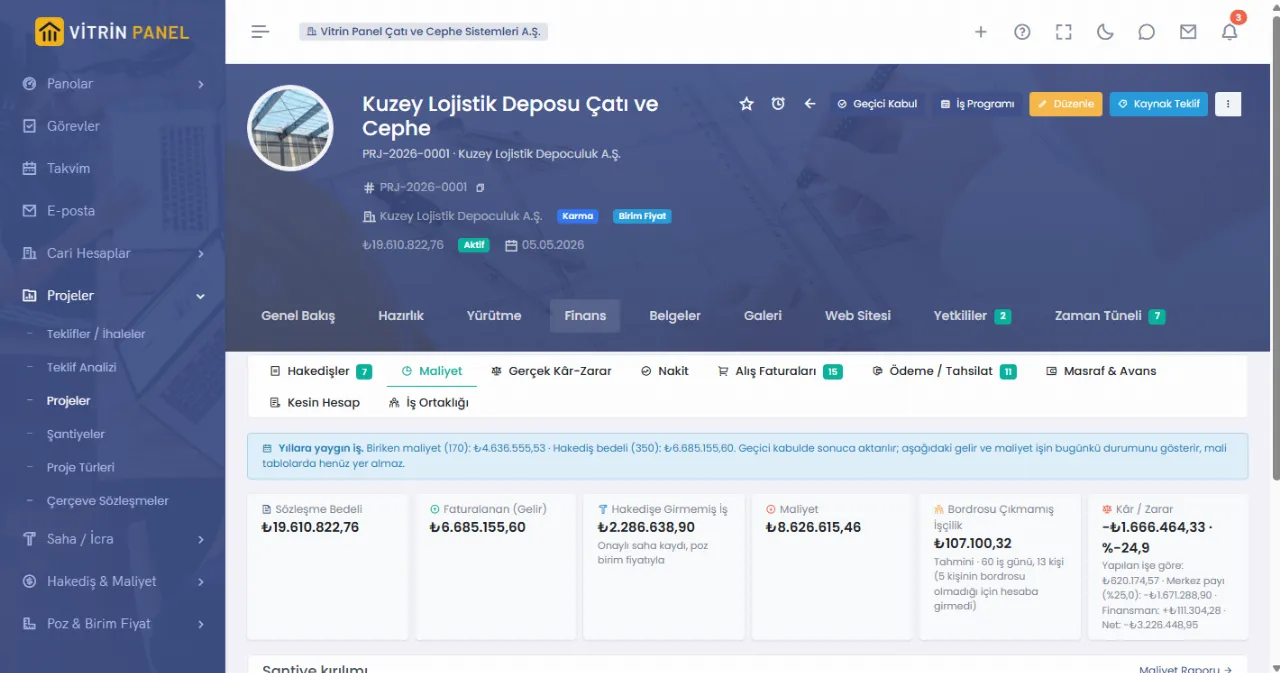
The real profit of a project, without waiting for month end

  • Contract value, invoiced amount, unbilled work and cost on one screen.
  • Labour not yet on payroll is included as an estimate, so there are no month-end surprises.
  • Head office share and financing cost are shown on separate lines.
  • The site breakdown shows which site is losing money.
Project cost screen: contract value, invoiced, cost and profit / loss cards
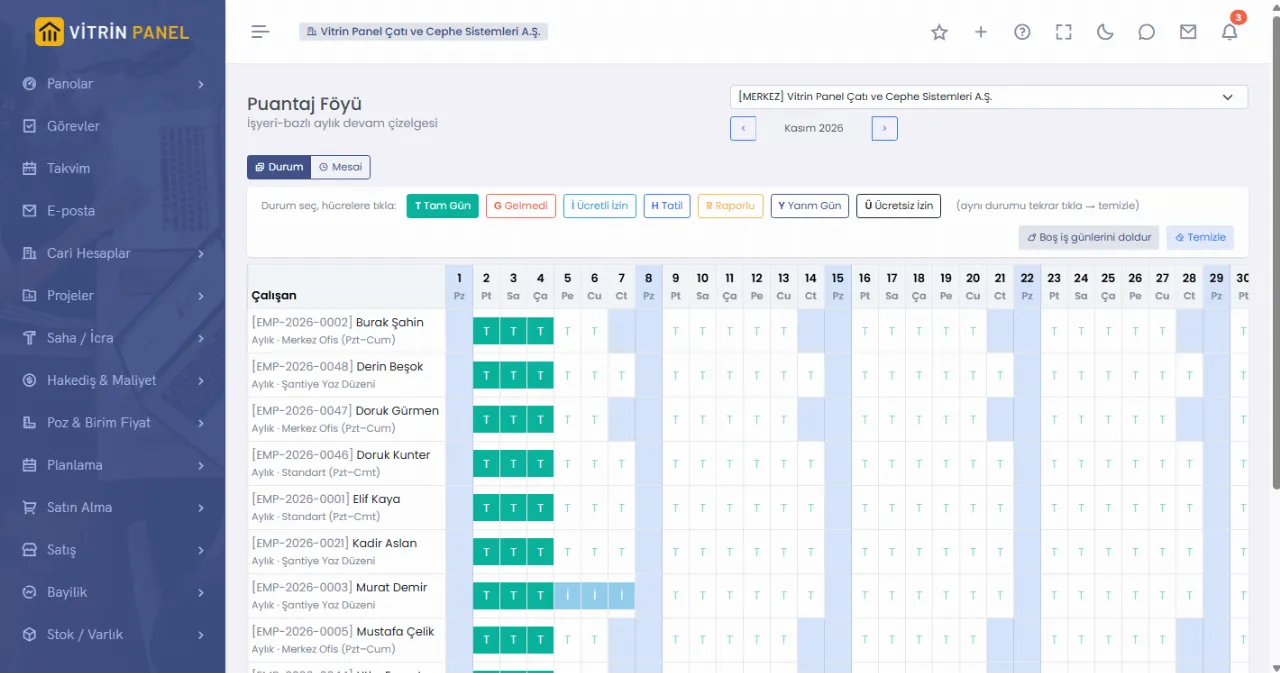
Timesheets and payroll

Enter the timesheet once; it flows into payroll and cost

  • A calendar that already knows work patterns, public holidays and leave.
  • Approved sheets and paid months are locked; no retroactive changes.
  • Payroll is calculated from the timesheet; social security and withholding files are produced.
  • Labour cost is split across workplaces by days worked.
Monthly timesheet: staff rows and day columns
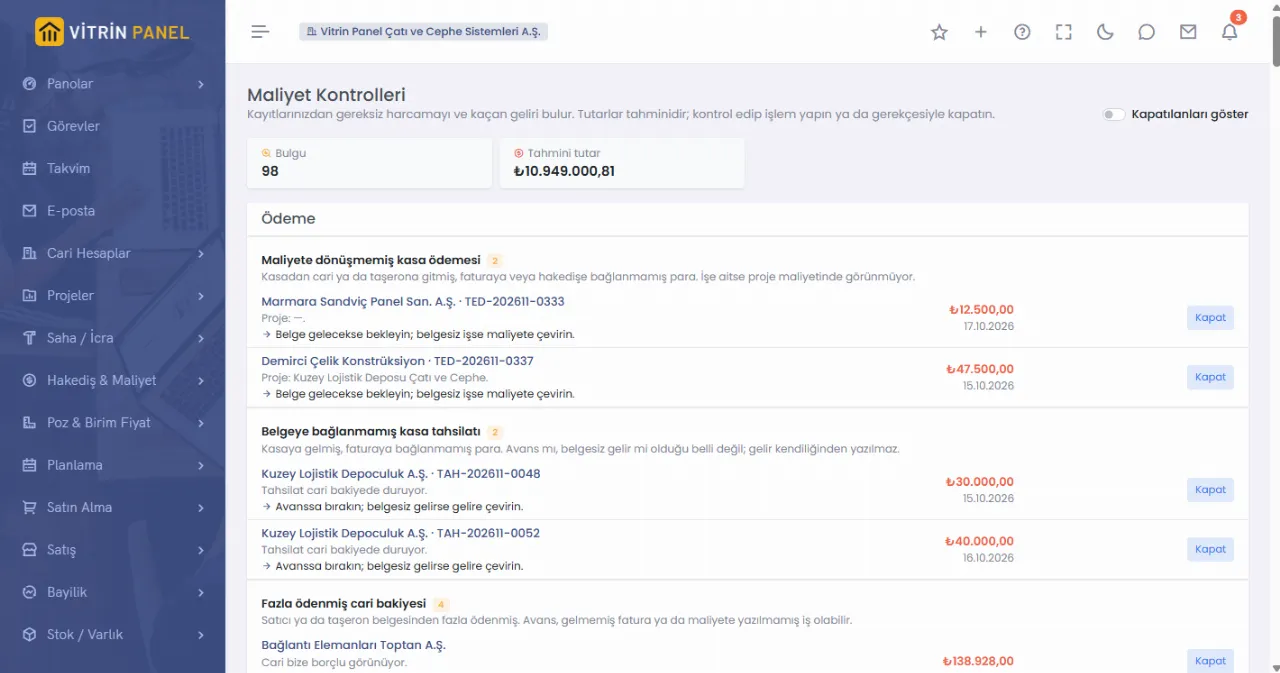
Cost controls

The system finds the money that leaks

  • Duplicate purchase invoices, invoices above the order price, quantities above goods receipt.
  • Payments and collections not linked to an invoice, overpaid account balances.
  • Machines fuelled on idle days, payroll paying more days than the timesheet, marketplace payouts missing from the bank.
  • More than thirty rules run on existing records; no extra data entry.
Cost controls screen: payment and collection findings with estimated amounts
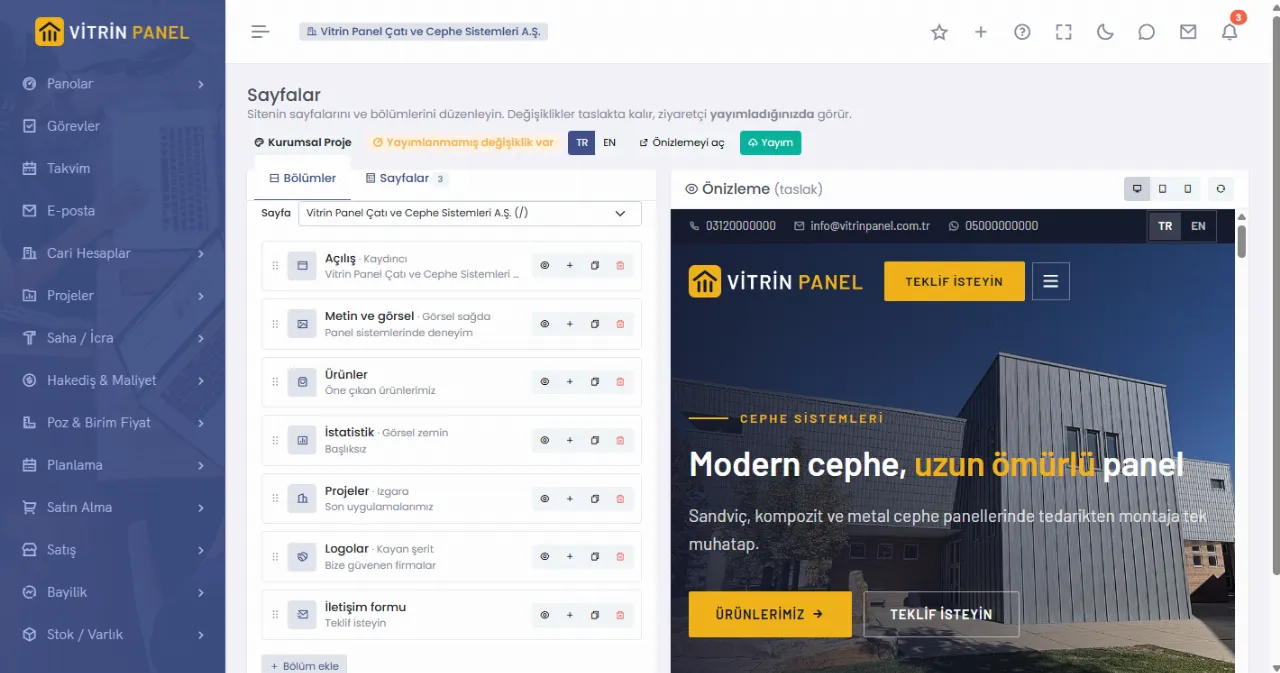
Website

Your company website lives in the same system

  • Ready-made themes and sections; change text and images in the editor, visitors see them once you publish.
  • Publish projects, products and references from their own cards; prices, stock and personal data never reach the site.
  • Turkish and English pages, social media links and video.
  • Visitor forms are saved with data protection consent and arrive in the ERP as a notification.
Website editor: section list and a live preview of the site
Live demo

Explore months of records from a fictional company

Projects, billings, marketplace orders, production orders, timesheets, payroll and journal entries were produced by a real workflow. The company, people and addresses in it are fictional.

No password needed: press “Try the demo” on the sign-in screen.

Go to the demo
Modules

Not separate programs, parts of one system

Customer, product, workplace and employee cards are opened once; every module uses the same card.

Accounts and CRM

Account cards, tax number check, meeting follow-ups, statements and reconciliation.

Sales and Dealership

Quotes, sales orders, price lists, invoices, deliveries, dealer rebates.

Marketplaces

Orders, stock, shipping labels, returns, account statements, product profit.

Purchasing and Stock

Requests, quotations, approvals, orders, goods receipt, warehouses, counts, fixed assets.

Production

Recipes, work centres, production orders, scrap and variance report.

Bids and Estimates

Quantities, estimates, official price item archive, bid letters.

Projects and Scheduling

Gantt, critical path, earned value, budgets and revisions.

Field and Quality

Site logs, site diary, inspections, concrete samples, non-conformities.

Billing and Contracts

Customer and subcontractor billing, advances, guarantees, price escalation, final account.

HR and Payroll

Personnel files, leave, timesheets, meals, payroll, social security, severance, discipline.

Finance and Treasury

Cash, bank, cheques / notes, loans, corporate cards, cash forecast.

Accounting

Uniform chart of accounts, journal, trial balance, balance sheet, VAT, period close.

e-Documents

e-Invoice, e-Archive and e-Waybill; sending and inbox through an integrator.

Fleet and Safety

Vehicle scorecards, fuel statements, damage, policies; risks, incidents, PPE, exams.

Website

Themed company website, editor, content from ERP records, two languages.

Partner Portal

Subcontractors and suppliers see only their own billings, documents and filings.

See what every module does

The Features page walks through everything from sales to accounting, one by one, with screenshots.

Browse the features
Compliance

Written for Türkiye's rules

Legal rates and amounts are kept with their effective dates. When a rate changes, old documents keep the old rate and new ones use the new rate.

Uniform chart of accounts

The chart comes ready; statutory accounts are locked, you open the sub-accounts.

Dated rates

VAT, withholding, tax brackets and the social security ceiling apply by document date.

Line-level taxes

Withholding, special consumption, communication and accommodation taxes are calculated per invoice line.

e-Invoice, e-Archive, e-Waybill

Integrator connection; tax numbers are checked against the revenue administration list, and invoices issued on the GİB portal are linked from their XML.

Social security filings

Monthly premium returns, hire / exit filings and subcontractor social security tracking.

Annual legal amounts

Minimum wage, social security and severance ceilings and the fixed asset threshold are entered once a year and apply everywhere.

Withholding return check

Payroll and journal entries are compared person by person; differences show up before the return is filed.

Data protection

Privacy notices, requests and disposal; health data is encrypted, access and exports are logged.

Period lock

No entries can be opened or changed in a closed period; corrections are made with reversals.

Questions

Frequently asked questions

Which businesses is it for?

You choose your industry when signing up: construction (building or a specialist trade such as roofing and cladding), e-commerce and marketplace seller, or general business. Screen terms, ready-made categories and suggested modules follow your choice; modules are added as you need them.

Can I bring my existing data?

Customers, employees, products and opening balances are imported with Excel templates. Imported records pass the same rules as records entered by hand.

Can I connect my marketplace store?

Once you enter your Trendyol or Hepsiburada store API details, orders, returns, customer questions and account statements arrive by themselves and stock is reported to the store. Orders and products are pulled from your ikas store. Phone or Instagram orders are added by hand.

How does my accountant use it?

You give your accountant a read-only account; they see entries, the trial balance and tax reports but cannot change them. Entries are exported to their accounting software in Excel, and their adjusting entries are imported back.

I have more than one company.

Each company runs in its own database. One user can belong to several companies and switch between them without signing out.

Can my subcontractors and suppliers use it?

With the Partner Portal they see only their own billings, documents and social security filings from their own account. These accounts do not count towards your users.

Does it work on phones and in English?

The screens adapt to phones; there is no separate app to install. Each user chooses Turkish or English for the interface.

How is my data protected?

Each company's data is kept in a separate database and backed up every night. Users are authorised by role and workplace, and changes are stored with who / when.

What happens when the trial ends?

Your data is not deleted. Until a subscription starts the account opens read-only; you can still view and export your records.